系统激活

admin5年前IT技术1074

win10激活 

slmgr /skms kms.03k.org
slmgr.vbs -ato


        计算机\HKEY_LOCAL_MACHINE\SOFTWARE\Microsoft\Windows NT\CurrentVersion\SoftwareProtectionPlatform      

        win10专业版激活  出现错误的解决方法

        计算机\HKEY_LOCAL_MACHINE\SOFTWARE\Microsoft\Windows NT\CurrentVersion\SoftwareProtectionPlatform

将SkipRearm的值修改为1 重启电脑

以管理员身份启动cmd,输入SLMGR -REARM,根据提示,再次重启电脑!


        slmgr /ipk W269N-WFGWX-YVC9B-4J6C9-T83GX


        slmgr /skms kms.03k.org

        slmgr.vbs -ato


office 激活

cd C:\Program Files (x86)\Microsoft Office\Office16
cscript ospp.vbs /sethst:kms.03k.org
cscript ospp.vbs /act


https://zhuanlan.zhihu.com/p/583036838


Office2016激活密钥专业增强版(神Key)Office2016永久激活密钥[2022.3更新]

226 人赞同了该文章

一、office2016专业增强版密钥(Retail零售版)

7B4BN-DQCH8-WFVMD-B9F3T-V6DVC

9B3BN-4XMXD-C7C6B-7XJ22-RVWDP5

TWCRT-QVNVH-XTKPM-BV2XX-QV7HC

8DJJQ-8NR7B-7QY7D-VCGPF-TVJ92

N8VWK-GP87X-HX6VF-99WD8-K2FQP

FMWMQ-H8N8X-98WYT-GQVM8-TQ8DP

XNW69-86KD3-YJHB6-YYYT3-B9892

WHKNR-W6RXW-XBYTQ-6G76H-BDW92

V2V9V-DNKXM-TWFJ7-BMC4V-WK892

R6WNH-6J9M7-KHC4K-Y3CVB-DPFQP

QQKF2-V2NWT-VFH63-XJ6GC-GQ8DP

QQKDR-PNXG2-X3YJC-RPRK2-FX83V

Office 2016 Pro Plus Volume License MAK Key(VL批量授权版):

QCKNG-29MKJ-74G4B-X7DT8-JFHBB

二、Office GVLK 密钥(kms激活专用)

Office Professional Plus 2016:XQNVK-8JYDB-WJ9W3-YJ8YR-WFG99

Office Standard 2016:JNRGM-WHDWX-FJJG3-K47QV-DRTFM

Project Professional 2016:YG9NW-3K39V-2T3HJ-93F3Q-G83KT

Project Standard 2016:GNFHQ-F6YQM-KQDGJ-327XX-KQBVC

Visio Professional 2016:PD3PC-RHNGV-FXJ29-8JK7D-RJRJK

Visio Standard 2016:7WHWN-4T7MP-G96JF-G33KR-W8GF4

Access 2016:GNH9Y-D2J4T-FJHGG-QRVH7-QPFDW

Excel 2016:9C2PK-NWTVB-JMPW8-BFT28-7FTBF

OneNote 2016:DR92N-9HTF2-97XKM-XW2WJ-XW3J6

Outlook 2016:R69KK-NTPKF-7M3Q4-QYBHW-6MT9B

PowerPoint 2016:J7MQP-HNJ4Y-WJ7YM-PFYGF-BY6C6

Publisher 2016:F47MM-N3XJP-TQXJ9-BP99D-8 837 K

Skype for Business 2016:869NQ-FJ69K-466HW-QYCP2-DDBV6

Word 2016:WXY84-JN2Q9-RBCCQ-3Q3J3-3PFJ6

office2016激活密钥使用教程

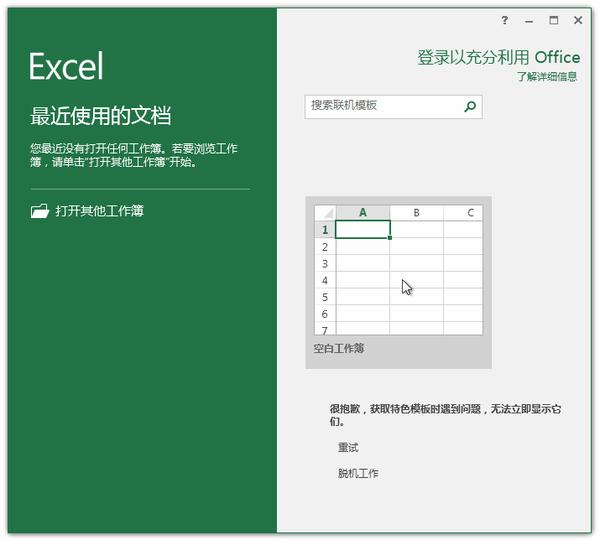
在安装完成Office 2016专业增强版后,随便打开一个Office工具,如果安装的是批量授权版(Vol)按下图所示进入激活界面

动图封面


批量授权版(Vol)Office 2016激活密钥输入窗口

如果安装的是零售版(Retail)当打开Office任一工具时会自动弹出激活密钥输入窗口
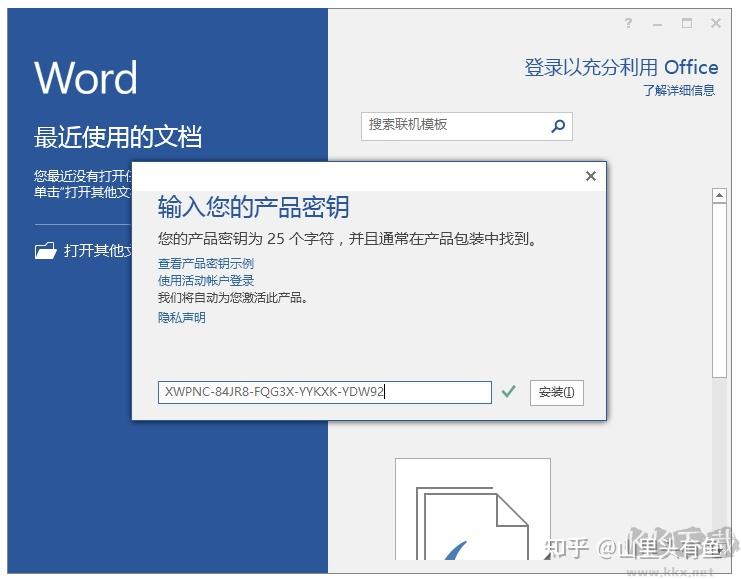


零售版(Retail)Office 2016激活密钥输入窗口

通过上面的Office2016激活密钥就可以完美激活Office2016了,当然激活密钥有一定的时效性,如果失效那么就需要使用Office2016来进行激活了。

发布于 2022-11-13 16:59・上海


相关文章

汇成公安部门建站CMS系统V1.0

汇成公安部门建站CMS系统V1.0后台地址:您的地址/admin/login.asp帐号:admin密码:admin ˂a target="_blank" href="download/HC...

Android Studio4.1.3设置app全屏

 Android Studio4.1.3设置app全屏<style name="AppTheme.FullScreen">   ...

msyql插入数据要把双引号转成斜杠,否则大量插入HTML会出错

addslashes 此函数,在每个双引号前添加斜杠\ stripslashes 此函数,删除反斜杠....

L2TP端口

1701,1702,4500,500...

免费教Php,前端开发,asp.net,c#,拯救无业青年

免费教Php,前端开发,asp.net,c#,拯救无业青年

从事互联网开发15年,如果你对计算机编程有兴趣,都可以来找我我能教你的有如下技术:asp.net php c# javascript 前端开发 ...

1.解压缩

将下载到本地的安装介质解压缩。然后,将解压后的文件夹mysql-5.7.16-winx64拷贝到安装目录(E盘根目录)下。

2.设置系统环境变量

右键点击 计算机>>属性>> 高级系统属性>>环境变量>> 编辑 Path ,在最后添加” ;E:\mysql-5.7.16-winx64\bin“,确定。

3.创建my.ini 文件和data目录,配置安装路径与数据存储路径

在E:\mysql-5.7.16-winx64目录下创建data目录和my.ini,并在my.ini中配置安装路径与数据存储路径等信息。

点击(此处)折叠或打开

  1. [mysql]
  2. default-character-set=utf8
  3. [mysqld]
  4. max_connections=200
  5. default-storage-engine=INNODB
  6. basedir =E:\mysql-5.7.16-winx64\bin
  7. datadir =E:\mysql-5.7.16-winx64\data
  8. port = 3306


4.安装MySQL服务

首先,以管理员身份运行 cmd 并切换到MySQL的bin目录下;

接下来,执行mysqld --initialize-insecure

    这条命令用来初始化data文件,其中insecure选项指定登录无需口令。

点击(此处)折叠或打开

  1. D:\>e:
  2.  
  3. E:\>cd mysql-5.7.16-winx64
  4.  
  5. E:\mysql-5.7.16-winx64>cd bin
  6.  
  7. E:\mysql-5.7.16-winx64\bin>mysqld --initialize-insecure
  8.  
  9. E:\mysql-5.7.16-winx64\bin>

需要注意的是,如果不指定insecure选项,则会随机生成登陆密码, 在E:\mysql-5.7.16-winx64\data文件夹下,有一个 hoegh.err 文件,其中hoegh是主机名,打开会看到:
2016-10-20T09:34:56.806257Z 1 [Note] A temporary password is generated for root@localhost: p-mcI:ijR6Xg,
其中 p-mcI:ijR6Xg即为随机密码。

然后,输入 mysqld --install安装MySQL服务

我们会看到界面出现:Server successfully installed,这就说明MySQL服务安装成功。 

点击(此处)折叠或打开

  1. E:\mysql-5.7.16-winx64\bin>
  2.  
  3. E:\mysql-5.7.16-winx64\bin>mysqld --install
  4. Service successfully installed.
  5.  
  6. E:\mysql-5.7.16-winx64\bin>

5.启动MySQL服务

输入  net start mysql  回车, 就会看到: MySQL 服务已经启动成功。尝试使用root用户登录数据库,并通过show databases命令查看数据库概要信息。

点击(此处)折叠或打开

  1. E:\mysql-5.7.16-winx64\bin>
  2. E:\mysql-5.7.16-winx64\bin>net start mysql
  3. MySQL 服务正在启动 .
  4. MySQL 服务已经启动成功。
  5.  
  6.  
  7. E:\mysql-5.7.16-winx64\bin>mysql -u root
  8. Welcome to the MySQL monitor. Commands end with ; or \g.
  9. Your MySQL connection id is 2
  10. Server version: 5.7.16 MySQL Community Server (GPL)
  11.  
  12. Copyright (c) 2000, 2016, Oracle and/or its affiliates. All rights reserved.
  13.  
  14. Oracle is a registered trademark of Oracle Corporation and/or its
  15. affiliates. Other names may be trademarks of their respective
  16. owners.
  17.  
  18. Type 'help;' or '\h' for help. Type '\c' to clear the current input statement.
  19.  
  20. mysql> show databases;
  21. +--------------------+
  22. | Database |
  23. +--------------------+
  24. | information_schema |
  25. | mysql |
  26. | performance_schema |
  27. | sys |
  28. +--------------------+
  29. 4 rows in set (0.00 sec)
  30.  
  31. mysql>


6.修改root密码

    安全起见,我们修改一下root密码。

点击(此处)折叠或打开

  1. mysql>
  2. mysql> alter user 'root'@'localhost' identified by 'root';
  3. Query OK, 0 rows affected (0.00 sec)
  4.  
  5. mysql>
  6. mysql> exit
  7. Bye
  8.  
  9. E:\mysql-5.7.16-winx64\bin>mysql -u root -proot
  10. mysql: [Warning] Using a password on the command line interface can be insecure.
  11. Welcome to the MySQL monitor. Commands end with ; or \g.
  12. Your MySQL connection id is 4
  13. Server version: 5.7.16 MySQL Community Server (GPL)
  14.  
  15. Copyright (c) 2000, 2016, Oracle and/or its affiliates. All rights reserved.
  16.  
  17. Oracle is a registered trademark of Oracle Corporation and/or its
  18. affiliates. Other names may be trademarks of their respective
  19. owners.
  20.  
  21. Type 'help;' or '\h' for help. Type '\c' to clear the current input statement.
  22.  
  23. mysql> show databases;
  24. +--------------------+
  25. | Database |
  26. +--------------------+
  27. | information_schema |
  28. | mysql |
  29. | performance_schema |
  30. | sys |
  31. +--------------------+
  32. 4 rows in set (0.00 sec)
  33.  
  34. mysql>


MySQL数据库可以用任意ip连接访问的方法


过CMD命令行修改

MYSQL安装

  今天在Windows Server 2008 r2系统下部署了MySQL Community Server 5.7.16,安装过程中也遇到了一些问题,在这儿记录一下最终的安装过程。0.下...

发表评论    

◎欢迎参与讨论,请在这里发表您的看法、交流您的观点。